

Page Last Updated on 2024-11-27
New for Version 24.0
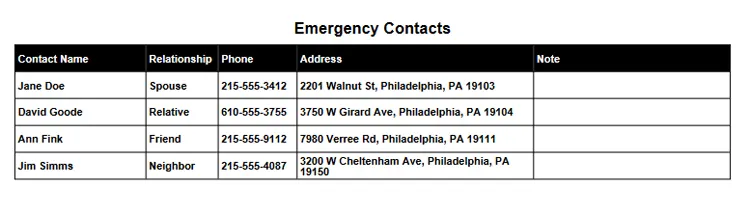
Accessing the Emergency Contacts List
To access the Emergency Contacts List: On the toolbar, click on the Contacts button. The Emergency Contacts screen will appear.

Editing the Emergency Contacts List
The Emergency Contacts List can be edited the following ways:
- Add a Contact to the Emergency Contacts List
- Edit an Contact on the Emergency Contacts List
- Change the Sort Order of a Record in a List
- Delete a Record in a List
- Delete Multiple Records in a List
See Also
- How to Create a Personal Medical Record Report containing an Emergency Contact List
Comments / Questions
Copyright © 2026 TruVes Systems LLC. All rights reserved.
See Trademarks
of TruVes Systems LLC.