

Page Last Updated on 2025-08-17
New for Version 24.0
The example used in this guide shows the Medications list. However, the Sort Order feature on the other lists in MedZuse function the same way.
How to Change the Sort Order of a Record in a List
Step 1: In the list, with the mouse, select the row of the record that you want to move within the list.
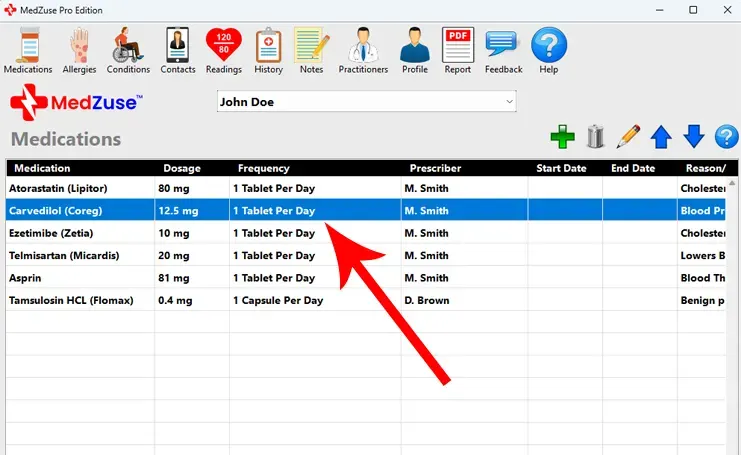
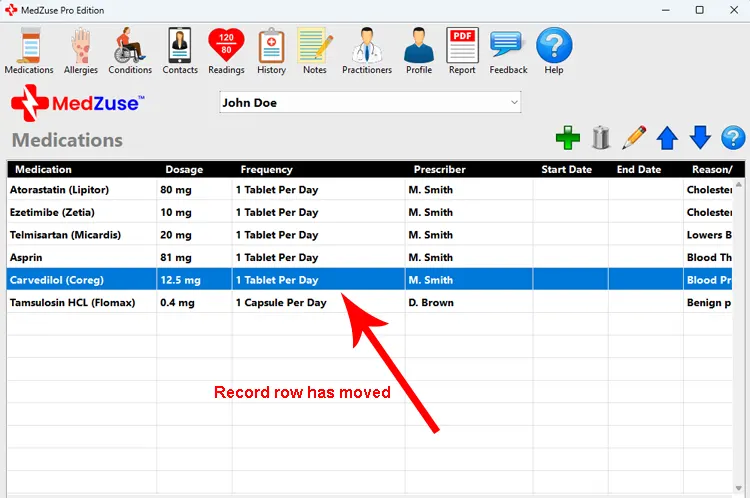
Step 2: With the record row selected, click the Move Selected Row Down button (down-arrow icon). Click the button repeatedly to move the selected record to the desired row in the list.
Tip: Alternatively, you can press the Down Arrow key on your keyboard while the record row is selected.
The Move Selected Row Up button (up-arrow icon) and the Up Arrow key on your keyboard behave in an a similar manner.
See also
- How to Import the Medications List
- How to Export the Medications List
- How to Add the Medications List the Blood Pressure Report
Comments / Questions
Copyright © 2026 TruVes Systems LLC. All rights reserved.
See Trademarks
of TruVes Systems LLC.