

Page Updated on October 29, 2026
New for Version 26.1
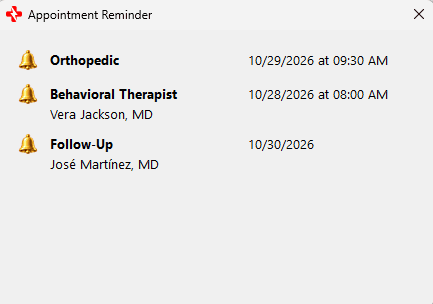
About the Appointment Reminder System
The Appointment Reminder System allows you to set reminders for upcoming appointments recorded in MedZuse.
Currently, appointment reminders are available for appointments entered in the Doctor Visits section.
A reminder can be set to appear on the day of the appointment or a specified number of days before the appointment. Reminders are displayed when MedZuse starts.
Setting an Appointment Reminder
To set a reminder, open a record in the Doctor Visits section and enter a Next Appointment date. The appointment time is optional.
On the Doctor Visit Record screen, click the Reminder button (bell icon) next to the Next Appointment information and select how many days before the appointment you want the reminder to begin.

Available reminder options are:
- Same Day
- 1 Day
- 2 Days
- 3 Days
- 5 Days
- 7 Days
- 14 Days
- 30 Days
Save the Doctor Visit record to save the reminder.
A reminder cannot be set unless a Next Appointment date has been entered.
Appointment Date and Time
A Next Appointment can include a date only or a date and time.
To add an appointment time, click Set Time. If no time has previously been entered, the time initially defaults to 8:00 AM and can then be changed.
To remove the appointment time, click Clear Time.
The appointment time is optional and does not affect when the reminder begins.
When a Reminder Appears
A reminder becomes active on the date determined by the number of reminder days selected.
For example, if an appointment is scheduled for November 15 and a 7-day reminder is selected, the reminder becomes active on November 8th.
Because MedZuse may not be opened every day, an active reminder will still be displayed the next time MedZuse is started, provided the appointment date has not passed.
The reminder remains active through the appointment date. After the appointment date has passed, the reminder is automatically removed.
Viewing Appointment Reminders
Active appointment reminders are displayed automatically when MedZuse starts.
The Appointment Reminder window displays the appointment date and time, when applicable, along with information identifying the appointment.
Changing or Removing a Reminder
To change a reminder, open the associated Doctor Visit record and select a different reminder period.
To remove a reminder, open the Doctor Visit record and clear the reminder.
Save the Doctor Visit record to save the change.