

Release Date: October 29, 2026
General Improvements and Changes
Added the Upcoming List
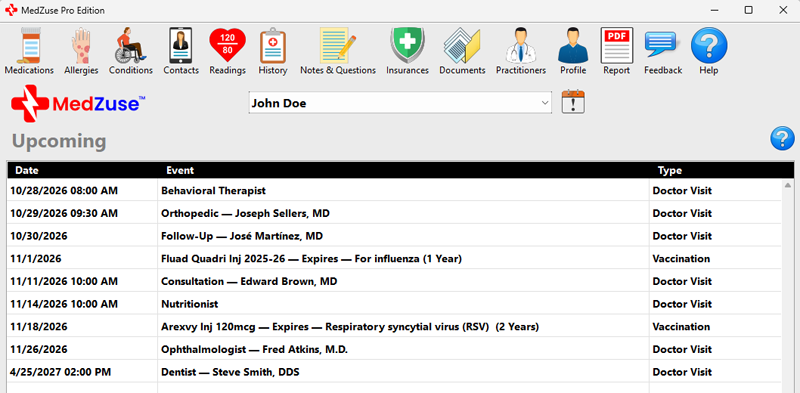
- The Upcoming List provides a single place to view upcoming health-related events recorded in MedZuse.
- The Upcoming List is created automatically from information already entered in MedZuse. Records are not added directly to the Upcoming List.
- Upcoming events from different sections of MedZuse are combined into one list and displayed in chronological order. This makes it easier to see what is coming up without having to check each section individually.
- The Upcoming List displays events occurring today through six months from the current date. Events more than six months in the future will automatically appear in the Upcoming List when they enter this six-month window.
- Currently, the Upcoming List displays appointment events from the Doctor Visits section and expiration dates from the Vaccinations section.
- To access the Upcoming List directly, click the Upcoming button located next to the User Name near the top of the MedZuse window.
Added the Appointment Reminder System
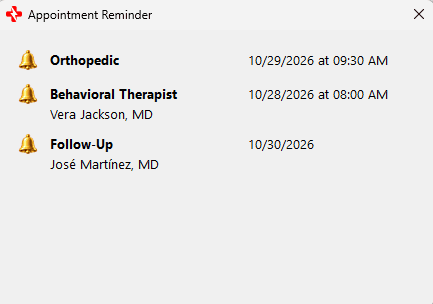

- The Appointment Reminder System allows you to set reminders for upcoming appointments recorded in MedZuse.
- Currently, appointment reminders are available for appointments entered in the Doctor Visits section.
- A reminder can be set to appear on the day of the appointment or a specified number of days before the appointment. Reminders are displayed when MedZuse starts.
- To set a reminder, open a record in the Doctor Visits section and enter a Next Appointment date. The appointment time is optional
- On the Doctor Visit Record screen, click the Reminder button (bell icon) next to the Next Appointment information and select how many days before the appointment you want the reminder to begin.
Improved Tooltip Display for the Note Column in All Sections
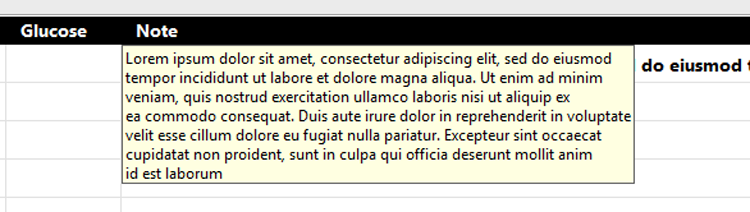
- Tooltips in the Note columns throughout MedZuse now display multiple lines, making longer notes easier to read without opening the record.
Renamed Notes Button

- Renamed the Notes button to Notes & Questions to better reflect the information that can be stored in this section.
Improved Readability for Medications List
- The On Hand column in the Medications List is center-aligned for improved readability.
Improved Record Saving and List Performance
- Improved how records are saved and ordered in several areas of MedZuse, resulting in faster performance when adding, deleting, and rearranging records.
Improved Error Logging for Unhandled Exceptions
- Enhanced Unhandled Exception error logging to capture more detailed diagnostic information.
Bug Fixes
- FIXED: In the Vaccinations section of the report, the word “Expiration” in the “Expiration Date” column header wrapped onto two lines. This has been corrected.
- FIXED: Resolved an issue that could cause users to receive the error message “NilObjectException at App.Event_Opening“ when launching MedZuse.
- FIXED: Fixed an issue that could prevent MedZuse from successfully checking for application updates.
- FIXED: Corrected the automatic On Hand calculation for medications taken at hourly intervals, such as Every 6 Hours or Every 12 Hours.
- FIXED: Improved compatibility with recently introduced Windows time zones that could cause MedZuse to crash.
Help Documents
- ADDED: The Upcoming List
- ADDED: The Appointment Reminder System
- REVISED: Welcome to the MedZuse Help
See Also
- Release notes for other releases of MedZuse.
Comments / Questions
Copyright © 2026 TruVes Systems LLC. All rights reserved.
See Trademarks
of TruVes Systems LLC.