

Page Last Updated on 2025-11-12
Release Date: 2025-11-12
General Improvements and Changes
The Documents and Images List Header Now Contains a Tooltip Identifying the column “Documents Included in the Report”.

- The Tooltip appears when a cursor hovers over the “Report PDF” icon in the header over the column.
Document Attachments are now available in more categories
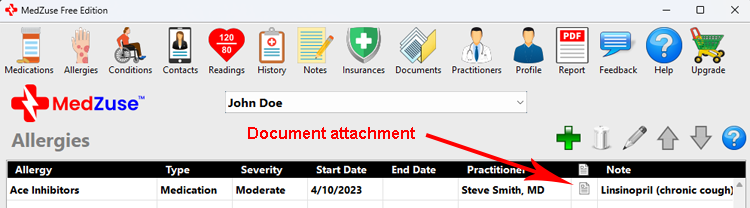
- The Document Attachment feature is now available for the following categories:
- Allergies
- Doctor Visits
- Conditions
- Insurances
- Treatments
- Notes & Questions
- Family Medical History
- Medications
- Vaccinations
- Hospitalizations
- Surgeries and Procedures
- While some of the above categories are accessible in the Free Edition, the Document Attachment feature is available in the Pro Edition only.
- Documents previously saved in the Documents section can be used as a Document Attachment at any time.
- Previously saved documents can also be shared across entries as a Document Attachment.
A New Note Window, in which you can now enter and view an unlimited amount of text

- With the new Note Window, you can enter and view an unlimited amount of text for each record.
- The window can also be resized to your preference.
Accessing the new Note Window
- To access the Note Window, from any Note Field, click the “pop-up” icon.


Now you can create a list of your Current Medications Only in the MedZuse Report
-
MedZuse lets you manage both your current and past medications. A medication can include an End Date, which indicates when you stopped taking it. While your MedZuse Report can include all medications—past and present—you may sometimes want a simplified list showing only the medications you are currently taking. This can be helpful for sharing with a caretaker, keeping as a quick reference, or posting somewhere visible for easy access. MedZuse now includes an option to generate a Current Medications Only list within the MedZuse Report.
- For more information, see How to Include Your Current Medications Only in the Report
The Insurance Type field on the Insurances record now accepts custom Insurance Types
- The Insurance Type field will now let you choose from the existing list or enter your own custom type.
- “Life” insurance has now been added to the built-in list of options.
Microsoft Word Documents (.DOC and .DOCX) are no longer supported
- We have discontinued support for Microsoft Word Documents (.DOC and .DOCX). These file types are not compatible to be included in the MedZuse Report.
- We suggest that .DOC and .DOCX files be converted to the PDF format in Microsoft Word or LibreOffice.
- Previously entered Microsoft Word Documents (.DOC and .DOCX) can still be viewed within the MedZuse app, but cannot be included on the MedZuse Report.
On the Open (Document) Window, the user is no longer required to select a File Type to select a document
- The Open Document Window now shows all valid document and image file types at once.
New records in Notes & Questions now show on top of the listing
- This is now consistent with the Doctor Visits category.
- The user still has the option to sort the list as desired.
Bug Fixes
- Fixed: The Readings section of the Report now has a continuation header so that a section extending to multiple pages is properly labeled as “Continued“.
- Fixed: In the Medications section of the Report, in some cases, the date of the Start Date and End Date would break and separate onto a second line.
- Fixed: The Notes & Questions section of the Report now shows the records in the same sort order as listed in the app as expected.
Help Documents
- Added document: How to Include Your Current Medications Only in the Report
See also
- Release notes for other releases of MedZuse.
Comments / Questions
Copyright © 2026 TruVes Systems LLC. All rights reserved.
See Trademarks
of TruVes Systems LLC.