

Page Updated on June 18, 2025
New for Version 25.1
How to View a Document
To view a document that was previously saved as a Document Record of MedZuse, follow this simple one step instruction:
Step 1: On the Documents screen, click the Document Icon of the document that you want to view. The document that was previously saved will appear in the default viewer application for the appropriate document type.

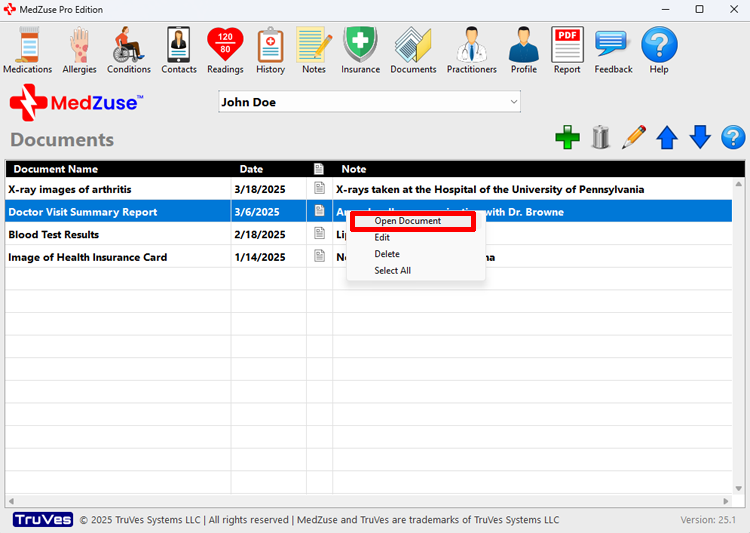
Alternative Method to View a Document
For an alternative way to view a document that was previously saved as a Document Record of MedZuse, follow this simple one step instruction:
Step 1: On the Documents screen, select the record in the list of the document that you want to view. While the record is selected, right-click on the row, then select Open Document from the popup menu. The document that was previously saved will appear in the default viewer application for the appropriate document type.
Printing a Document
The printing of the document is a function of the default viewer application. Consult your viewer application’s documentation for help to print your document.
See also
- Add a Document
- Edit a Document Record
- Delete a Record in a List
- Delete Multiple Records in a List
- Change the Sort Order of a Record in a List