

Page Last Updated on 2025-05-26
New for Version 25.1
How to Export a MedZuse Data File
Follow these two simple steps to export a MedZuse Data File:
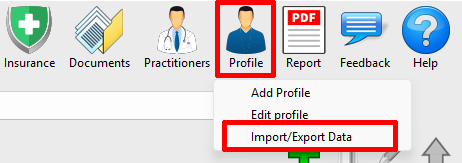
Step 1: On the toolbar, click on the Profile button and select Import/Export Data from the dropdown list. The Import / Export Data File window will appear.
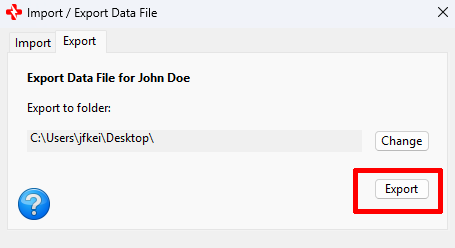
Step 2: On the Import / Export Data File window, select the Import tab. Optionally, you can change the output folder of the file to be exported by clicking the Change button and following the prompts. Then click the Export button.
You have successfully exported a MedZuse Data File!

See also
Comments / Questions
Copyright © 2026 TruVes Systems LLC. All rights reserved.
See Trademarks
of TruVes Systems LLC.