

Page Updated on October 29, 2026
New for Version 26.1
About the Upcoming List
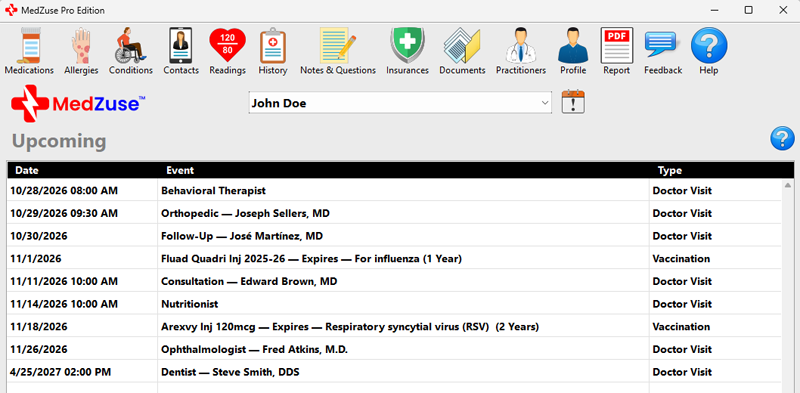
The Upcoming List provides a single place to view upcoming health-related events recorded in MedZuse.
Upcoming events from different sections of MedZuse are combined into one list and displayed in chronological order. This makes it easier to see what is coming up without having to check each section individually.
The Upcoming List displays events occurring today through six months from the current date. Events more than six months in the future will automatically appear in the Upcoming List when they enter this six-month window.
The list displays:
- Date – The date and time of the upcoming event, when a time is applicable.
- Event – A description of the upcoming event. Additional information, such as the practitioner or vaccination notes, may also be displayed.
- Type – The MedZuse section associated with the event, such as Doctor Visit or Vaccination.
The Upcoming List is created automatically from information already entered in MedZuse. Records are not added directly to the Upcoming List.
Currently, the Upcoming List displays appointment events from the Doctor Visits section and expiration dates from the Vaccinations section.
Accessing the Upcoming List
To access the Upcoming List, click the Upcoming button located next to the User Name near the top of the MedZuse window.

If the current user has upcoming events when MedZuse starts, the Upcoming List will be displayed automatically.
Viewing or Editing an Upcoming Event
To view or edit an event, double-click the event in the Upcoming List. MedZuse will open the associated record where you can view or make changes to the information.
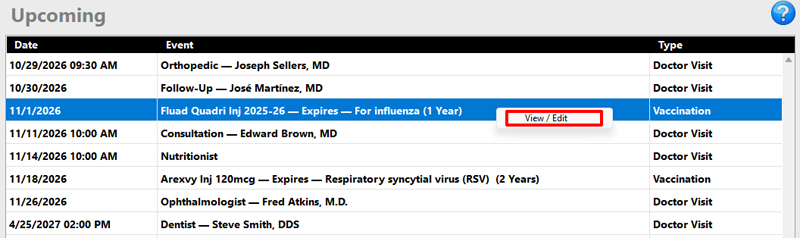
You can also right-click the event and select View / Edit.
Changes to an event are made in its associated MedZuse section, not directly from the Upcoming List.