

Page Last Updated on 2024-11-30
New for Version 24.0
The Vaccinations List is accessible only when you upgrade to the Pro Edition of Medzuse.
How to Edit a Record on the Vaccinations List
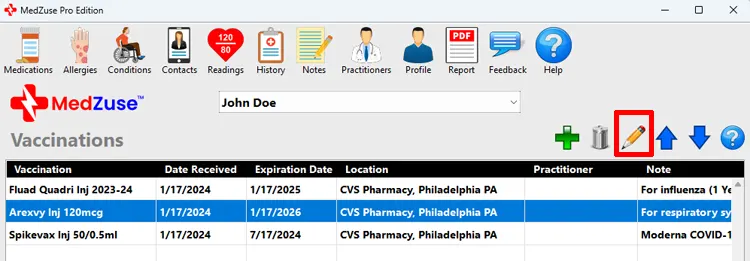
Step 1: On the Vaccinations screen, select the Vaccination Record in the list to be edited. Then click the Edit Selected Row button (the pencil icon). The Vaccination Record screen will appear.
Tips:
- Alternatively, you can press the Enter key on the keyboard while the row is selected to edit the record.
- Or you can use the mouse to double-click on the row to edit the record.
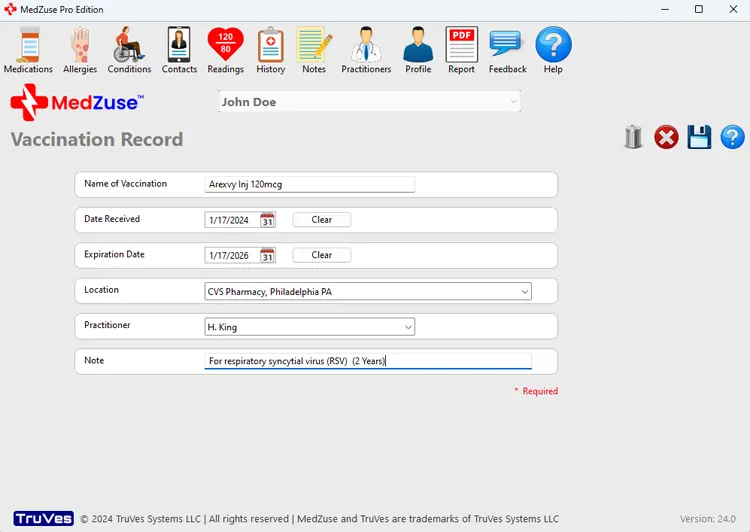
Step 2: On the Vaccination Record screen, the following fields are available to edit:
- Name of Vaccination (Required)
- Date Received
- Expiration Date
- Location
- Practitioner
- Note
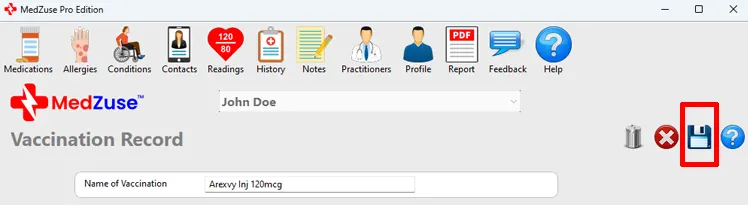
Step 3: After completing the desired fields, on the right-hand side of the Vaccination Record screen, click on the Save Record button to save the record.
Tip: Alternatively, you can press the Enter key on the keyboard while the cursor is positioned at any field, to save the record.
See also
Comments / Questions
Copyright © 2026 TruVes Systems LLC. All rights reserved.
See Trademarks
of TruVes Systems LLC.