

Page Last Updated on 2025-11-07
New for Version 25.5
MedZuse lets you manage both your current and past medications. A medication can include an End Date, which indicates when you stopped taking it.
While your MedZuse Report can include all medications—past and present—you may sometimes want a simplified list showing only the medications you are currently taking. This can be helpful for sharing with a caretaker, keeping as a quick reference, or posting somewhere visible for easy access.
MedZuse now includes an option to generate a Current Medications Only list within the MedZuse Report.
Follow these easy steps to include only your current medications in the report:
Creating a List of Current Medications Only
Step 1: On the toolbar, click on the Report button and select Create Report from the dropdown list. The Create Report window will appear.
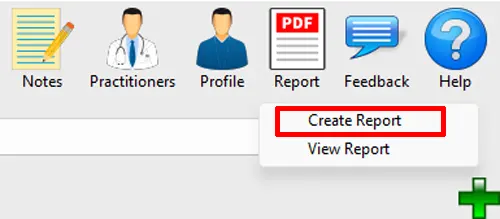
Step 2: On the Create Report window, click the Options button.

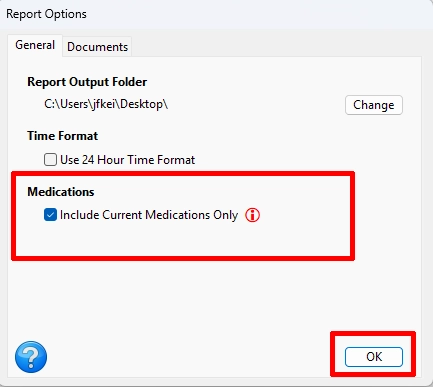
Include Current Medications Only
Step 3: On the Report Options window, select the General tab. Under Medications, Check “Include Current Medications Only”. Then click the OK button to save and close the Report Options window.
Create the Report
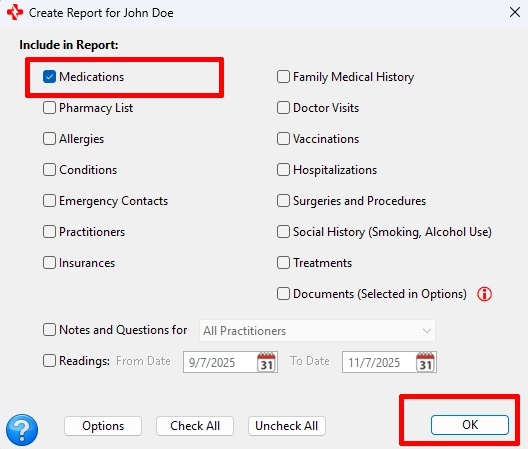
Step 4: On the Create Report window, if you want a single page PDF of your current medications, make sure that just Medications is selected. Then click the OK button to generate your MedZuse Report.
Note: The printing of the report is a function of your PDF reader. Consult your PDF reader’s documentation for help to print your report.
See also
Comments / Questions