

Page Last Updated on 2025-11-24
Release Date: 2025-11-24
General Improvements
Body Temperature has been added to the Other Readings Screen

- If you track your body temperature, you can now include it with your blood pressure measurements.
Progress View Now Includes Other Readings

- Other readings, such as Average Weight, and Average Glucose are now included in Progress View
- Other readings appear on both the Progress View screen and on the Progress View table on the Report.
Now you can change the Sort Direction of the Data on the Progress View screen

- The default sort order of the data on the Progress View screen is in descending order by date, with the most recent records on top of the list. To change the sort direction, just click on the Date column header.
Now you can change the Sort Direction of the Progress View Table in BPTrakr Reports
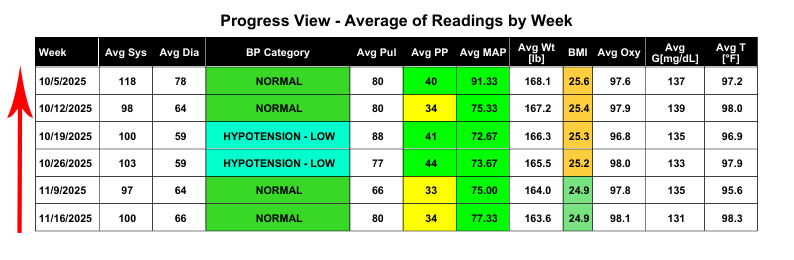
- For more information, see help document: How to Change the Sort Direction of the Progress View Table in BPTrakr Reports.
Introducing the ‘Dates With Data’ Calendar
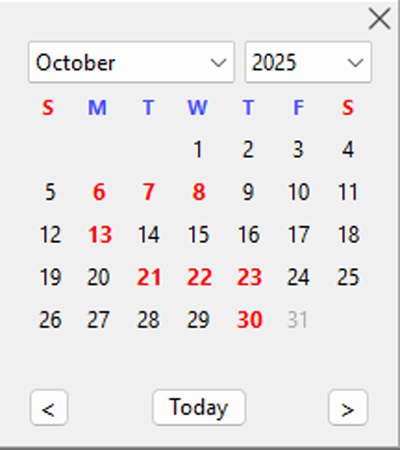
- The Dates With Data Calendar is a visual enhancement in BPTrakr that helps you quickly identify days which contain recorded blood pressure readings. Dates shown in bold red indicate that data has been entered for that day, making it easy to spot and select days with readings.
- The Dates With Data Calendar appears only in the date range fields of the Data, Progress View, Graphs, and Statistics sections of BPTrakr. Other areas continue to use the standard calendar without red data indicators.
- For more information, see help document: Using the Dates With Data Calendar.
Bug Fixes
- The Mean Arterial Pressure (MAP) Graph in the Blood Pressure Reports now show dates in ascending (verses descending) order as expected.
- In Progress View, the weekly calculation logic was grouping Sunday readings with the previous week instead of starting a new week on Sunday morning. A new week begins immediately at 12:00 AM every Sunday. Any reading taken on Sunday is now included in the new week’s averages.
Help Documents
- Added document: Using the Dates With Data Calendar.
- Added document: How to Change the Sort Direction of the Progress View Table in BPTrakr Reports.
- Revised document: Viewing the Data.
- Revised document: Viewing the Graphs
- Revised document: Viewing the Statistics
See also
- Release notes for other releases of BPTrakr.
Comments / Questions
Copyright © 2026 TruVes Systems LLC. All rights reserved.
See Trademarks
of TruVes Systems LLC.