

Page Last Updated on 2025-09-24
Release Date: 2025-09-24
General Improvements
Now you can change the Sort Direction of the Data Table in BPTrakr Reports 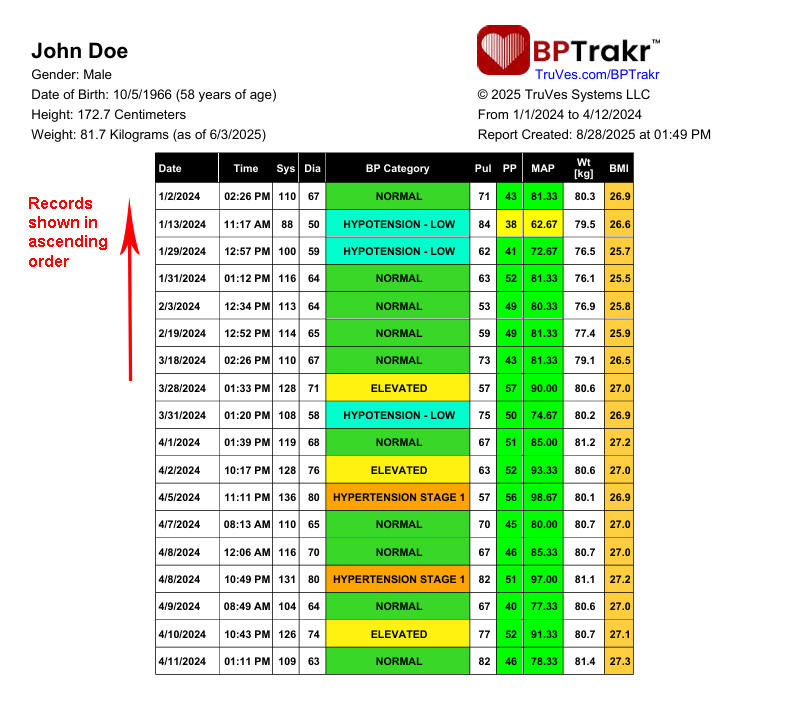
- For more information, see help document: How to Change the Sort Direction of the Data Table in BPTrakr Reports.
When exporting as a CSV file, the weight unit on the Export Tab of the Import/Export Data Window now defaults to the user’s current weight unit.
- When exporting as a CSV file, the weight unit (pounds or kilograms) on the Export Tab of the Import/Export Data Window now defaults to the user’s current weight unit, if it is in use.
When exporting as a CSV file, the blood glucose unit on the Export Tab of the Import/Export Data Window now defaults to the user’s current glucose unit.
- When exporting as a CSV file, the blood glucose unit (kilograms per decilitre or millimoles per litre) on the Export Tab of the Import/Export Data Window now defaults to the user’s current glucose unit, if it is in use.
To prevent data errors, username selector is now locked when editing profile
- To prevent data errors, username selector is now locked when editing a profile
Bug Fixes
- Fixed Database Error: UNIQUE constraint failed: tblUserReportPreference.user_id at BPTrakrDatabase.AddUserReportPrefsNonPro
- Fixed Error: NilObjectException at modError.WriteErrorLog
- Fixed: After a license purchase, the license key did not automatically download as expected.
- Fixed: When prompted with the Renewal Notification, answering “Yes” to renew license will now give buying options as expected.
Help Documents
- Added document: How to Change the Sort Direction of the Data Table in BPTrakr Reports.
- Revised document: How to Create, View and Print a Blood Pressure Report
See also
- Release notes for other releases of BPTrakr.
Comments / Questions
Copyright © 2026 TruVes Systems LLC. All rights reserved.
See Trademarks
of TruVes Systems LLC.