

Page Last Updated on 2025-03-14
Release Date: 2025-03-14
General Improvements
Introducing the Progress View data screen

- The Progress View data screen displays the average values of your blood pressure readings on weekly, monthly, or yearly increments. This data format shows the incremental progress of your blood pressure measurements over the selected date range.
- The Progress View screen is available in both the Free Edition and the Pro Edition of BPTrakr.
- For for information on this feature, see help document: Tracking Your Blood Pressure Progress Using Progress View.
Introducing the Blood Pressure and Pulse Progress Graph
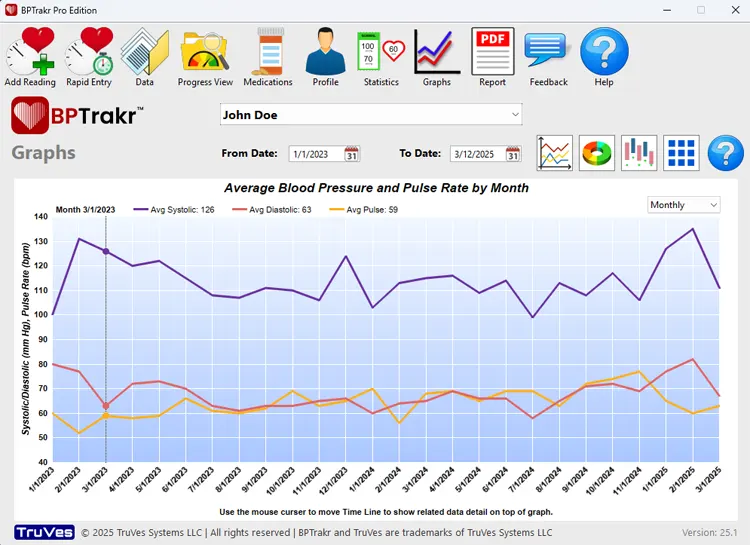
- The Blood Pressure and Pulse Progress Graph displays the average values of your blood pressure readings on weekly, monthly, or yearly increments. This data format shows the incremental progress of your blood pressure measurements over the selected date range.
- The Blood Pressure and Pulse Progress Graph feature is available in both the Free Edition and the Pro Edition of BPTrakr.
- For for information on this feature, see help document: Viewing the Blood Pressure and Pulse Progress Graph.
Introducing the Blood Pressure and Pulse Progress Table and Graph in BPTrakr Reports

- The Blood Pressure and Pulse Progress Table and Graph in BPTrakr Reports displays the average values of your blood pressure readings on weekly, monthly, or yearly increments. This data format shows the incremental progress of your blood pressure measurements over the selected date range.
- The Blood Pressure and Pulse Progress Table and Graph features in BPTrakr Reports is available only in the Pro Edition of BPTrakr.
- For for help on creating a BPTrakr Report, see help document: How to Create a Blood Pressure Report.
- See also, help document: How to Set the Incremental Frequency for the Blood Pressure and Pulse Progress Table and Graph in BPTrakr Reports.
Bug Fixes
Fixed: An error occurred during the license installation process when a user attempted to install a license that already existed.
Fixed: Some Graphs on the Graphs screen displayed the time line dates in descending order, now corrected to ascending order
Help Documents
Added document: Viewing the Blood Pressure and Pulse Progress Graph
- Added Help document: Viewing the Blood Pressure and Pulse Progress Graph.
Added document: Tracking Your Blood Pressure Progress Using Progress View
- Added Help document: Tracking Your Blood Pressure Progress Using Progress View.
Added document: How to Set the Incremental Frequency for the Blood Pressure and Pulse Progress Table and Graph in BPTrakr Reports
- Added Help document: How to Set the Incremental Frequency for the Blood Pressure and Pulse Progress Table and Graph in BPTrakr Reports.
See also
- Release notes for other releases of BPTrakr.
Comments / Questions
Copyright © 2026 TruVes Systems LLC. All rights reserved.
See Trademarks
of TruVes Systems LLC.