

Page Last Updated on 2024-10-28
Release Date: 2024-10-23
General Improvements
All timeline graphs now have angled dates for improved viewing
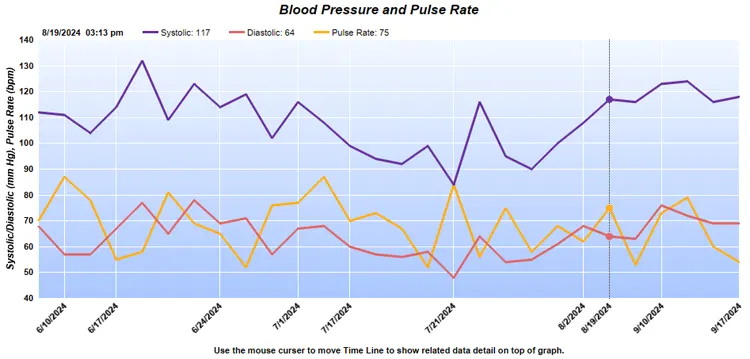
- All timeline graphs on the Graphs screen have been redesigned with angled dates for improved viewing.
Added “Average of Date Range” block to the BMI Chart
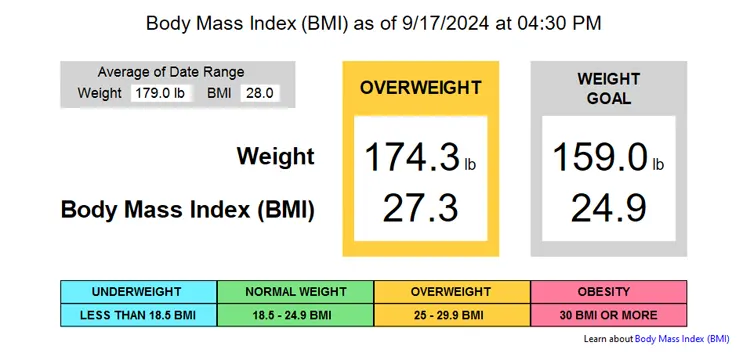
- A data block containing the user’s ‘Average of Date Range’ has been added to the BMI chart on the Statistics screen.
Medications feature now displays “1/4 Tablet” for dosage frequency
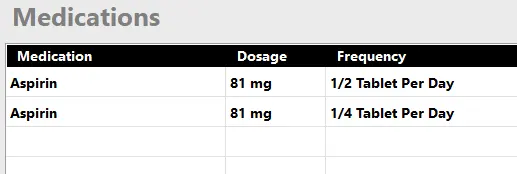
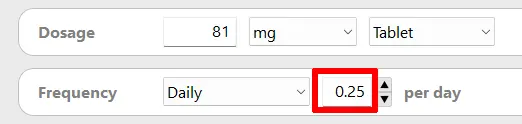
- The medication will display as “1/4 Tablet” when you enter 0.25 as number of tablets in the Frequency field of the Medications Record.
- Previously available, the medication will display as “1/2 Tablet” when you enter 0.5 as number of tablets in the Frequency field.
- The Medications feature is available to Pro Edition users only.
- For more information see Help document: How to Setup a Half or Quarter Tablet on a Medications Record.
The Time control on the Rapid Entry screen now defaults to the current time when the current date is selected on the Date control by the user.
- The Time control on the Rapid Entry screen now defaults to the current time when the current date is selected on the Date control by the user.
Added ‘Dose’ as a form of dosage to the Medications Record screen.
- The term ‘Dose’ was added as a form of dosage to the Medications Record screen.
Revised the maximum measurements notification on the AM vs. PM Measurement Comparison graph.
- For improved clarity, the maximum measurements notification on the AM vs. PM Measurement Comparison graph has been revised. The message now reads, “Because of viewing space limitations, this graph is showing a maximum of 60 measurements for the selected date range.”
The BPTrakr product website (BPTrakr.com) is moving to the company website of TruVes.com (TruVes.com/BPTrakr).
- The migration of BPTrakr.com to TruVes.com/BPTrakr should be completed by mid-November 2024. TruVes is the developer of BPTrakr.
Bug Fixes
Fixed: The maximum date on the Date control on the Rapid Entry screen did not update to the current date within a session.
- Previously, at the start of a session with the Rapid Entry screen, the maximum date was set to the current date. If the calendar date changed during a session, the user was unable to set the Date control to the current date. Now the maximum date is reset to the current date prior to every entry when the user changes the date on the Date control.
Help Documents
Added document: How to Setup a Half or Quarter Tablet on a Medications Record
- Added Help document: How to Setup a Half or Quarter Tablet on a Medications Record.
See also
- Release notes for other releases of BPTrakr.
Comments / Questions
Copyright © 2026 TruVes Systems LLC. All rights reserved.
See Trademarks
of TruVes Systems LLC.