

Page Last Updated on 2025-10-30
New for Version 25.6
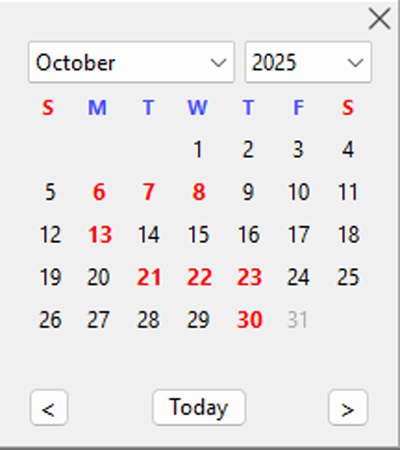
Dates With Data Calendar
Overview
The Dates With Data Calendar is a visual enhancement in BPTrakr that helps you quickly identify days which contain recorded blood pressure readings. Dates shown in bold red indicate that data has been entered for that day, making it easy to spot and select days with readings.
Red Dates
- Bold red text highlights days that contain blood pressure entries.
- Regular black text indicates a date with no recorded data.
- Light gray text shows dates outside the valid data range (unavailable).
Selected Date
The Selected Date on the calendar is displayed with a blue background and white text. If the Selected Date also contains recorded data, the white text with blue background is retained for readability.
Where You’ll See It
The Dates With Data Calendar appears only in the date range fields of the Data, Graphs, and Statistics sections of BPTrakr. Other areas continue to use the standard calendar without red data indicators.
Comments / Questions
Copyright © 2026 TruVes Systems LLC. All rights reserved.
See Trademarks
of TruVes Systems LLC.