
Track Your Blood Pressure and Create Printable Charts and Reports
BPTrakr is blood pressure tracking software for Windows, macOS, and Linux that helps you log readings, analyze trends, and create printable blood pressure charts and PDF reports for doctor appointments. Track blood pressure, pulse pressure, BMI, weight, blood glucose, and more — all while keeping your data private and stored locally on your computer.

Blood Pressure Tracker


Create Printable Blood Pressure Charts and Reports
With BPTrakr, you can create professional blood pressure reports in PDF format using your recorded readings. Reports can be printed or emailed and shared with your doctor during appointments.
BPTrakr also allows you to include a personalized Medications List with your report, making it easier to organize and present important health information in one place.
Analyze Blood Pressure Trends with Detailed Graphs and Charts
BPTrakr includes detailed blood pressure graphs and charts that help you visualize trends over time, compare readings, and better understand important health metrics such as pulse pressure, Mean Arterial Pressure (MAP), BMI, blood glucose, and blood oxygen saturation levels.
- Blood Pressure and Pulse Rate Graphs
- Blood Pressure Progress View Tables and Charts
- Blood Pressure Category Distribution Charts
- AM vs. PM Blood Pressure Comparison Graphs
- Mean Arterial Pressure (MAP) Graphs
- Weight and Body Mass Index (BMI) Graphs
- Blood Oxygen Saturation (SpO2) Graphs
- Blood Glucose Tracking Graphs
- And Many More


Track Blood Pressure and Other Important Health Data
BPTrakr helps you track blood pressure readings and other important health information over time, including weight, BMI, pulse pressure, blood glucose, oxygen saturation, medications, and custom notes.
- Blood Pressure Categories
- Weight Tracking in Pounds or Kilograms
- Body Mass Index (BMI)
- Pulse Pressure (PP)
- Mean Arterial Pressure (MAP)
- Blood Oxygen Saturation (SpO2)
- Blood Glucose Tracking
- Missed Medication Tracking
- Irregular Heartbeat Tracking
- Dizziness or Light-Headedness Notes
- Custom Health Notes
BPTrakr Testimonials
Paul Lachance
Verified User
This by far the best blood pressure tracking software I have ever used. Being a patient that has HBP and open heart surgery as well as a triple by-pass I need to keep track of my BP. My heart doctor like the reports generated by this program. Very easy to use and the developer is in my opinion the easiest I have works with. Very responsive. If you have a windows PC, this is the program to have and use for keeping track of your BP and other statics. My go to program. I will use nothing else.
Alana
Verified User
I’m very happy that I’ve found BPTrakr Pro. Its affordable and worth every penny. Before I was using complicated spreadsheets that were hard for my home nurses and also my doctor to follow along with. The reports this app generates are spot on and allow me to better manage my very rare chronic illness. I have tried a few other apps that claimed to act in the same way that BPTrakr Pro has but they were definitely a let down. I would recommend this app to anyone who were needing to track their blood presure, oxygen levels, weight.
Jason S.
Verified User
Very well written program. As recently diagnosed with high blood pressure – I need a tool to assist my doctor in making decisions for medication(s) and dietary changes. Though I have no blood-sugar level concerns – I know many with hypertension do – this tool is great. It will give my physician a report that will be useful in determining my care. You need some equipment, like a blood pressure monitoring system, possibly pulse oximeter, maybe a glucometer (if you are diabetic) – I chose the company Oxiline for my product needs (not a paid sponsor – just personal choice from research). Anyway, if you have high blood pressure, and/or diabetes – please place this application at that top of your list for consideration. I highly recommend BPTrakr Pro!
Brian Gregory
Verified User
A number of years ago I had two programs to record my BP and Blood sugar. The company went out of business and I upgraded to a new computer and when I reinstalled the programs I couldn’t activate them. I was not able to find a satisfactory tracking program. I stumbled onto BPTrakr and gave it a try. I quickly upgraded to the pro version and am able to track both BP and BG efficiently. It’s well worth your time and money to obtain this program.
Boguslaw R.
Verified User
This program is the best of all the ones I’ve used before. I will recommend it to my friends. It includes everything I expect from a program like this.
Mike Cleveland
Verified User
Absolutely wonderful product, best blood pressure monitor and overall health tracker available today!
Works on the computer you already use.
Available for Windows, Mac, and Linux.



COMING SOON FOR ANDROID
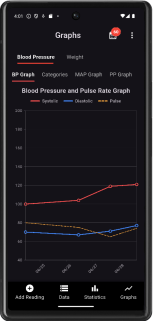
BPTrakr is Going Mobile
Blood pressure tracking and trends on your Android phone.
What Makes BPTrakr Different
- Truly Free to Use — No time limits, registration, or credit card required
- Native desktop software — Built specifically for Windows, macOS, and Linux. Not a mobile app running in an emulator.
- No Ads or Distractions — Enjoy a clean, distraction-free blood pressure tracking experience
- Unlimited Blood Pressure Logs — Track and store unlimited blood pressure readings, even in the Free Edition
- Track for the Whole Family — Supports multiple users for household blood pressure monitoring
- Advanced Blood Pressure Analysis Tools — Includes detailed graphs, trends, and progress tracking
- Create Printable Blood Pressure Charts and Reports — Export professional PDF reports for doctor appointments and sharing
- Weight and BMI Tracking Included — Track blood pressure, weight, and BMI in one place
- Private by Design — Unlike cloud-based tracking apps and services, your data stays stored locally on your computer for privacy
- Bilingual Support — Use in English or Spanish
Frequently Asked Questions
Can I print blood pressure charts and reports with BPTrakr?
Yes. BPTrakr lets you create printable blood pressure charts and professional PDF reports using your recorded readings. Reports can be printed or emailed and shared with your doctor or healthcare provider.
Does BPTrakr work offline?
Yes. BPTrakr is desktop software that stores your data locally on your computer. Internet access is not required to add and edit data.
Is BPTrakr free to use?
Yes. BPTrakr Free Edition can be used without a time limit, registration, or credit card. Some Pro Edition features are available with a purchased license.
Can I track blood pressure for more than one person?
Yes. BPTrakr supports multiple users, making it useful for tracking blood pressure readings for yourself or family members on the same computer.
Can I include a medications list in my blood pressure report?
Yes. BPTrakr Pro Edition allows you to include a personalized Medications List in your blood pressure report, helping you keep important health information organized for doctor appointments.
Is BPTrakr available for Windows, Mac, and Linux?
Yes. BPTrakr is available for Windows, macOS, and Linux.
How to Create and Print Blood Pressure Charts for Doctor Appointments
Create and print professional blood pressure charts and PDF reports with BPTrakr for Windows, macOS, and Linux. Learn how to track readings, monitor blood pressure trends over time, and generate printable reports to share with your doctor — all while keeping your data private and stored locally on your computer.