

Page Last Updated on 2025-01-15
New in Version 24.0
If you purchased your license key(s) directly from the TruVes website (truves.com), it is covered by a 30 day money back guarantee.
A qualified refund must be initiated by you, the end user, by removing the active license key from the MedZuse app. Follow these simple steps to remove the active license and get a full refund.
Instructions for Getting a Refund
Step 1: On the toolbar, click on the Help button and select License Keys… from the dropdown list. The License Keys window will appear.

Step 2: On the License Keys window, click on the Remove button.
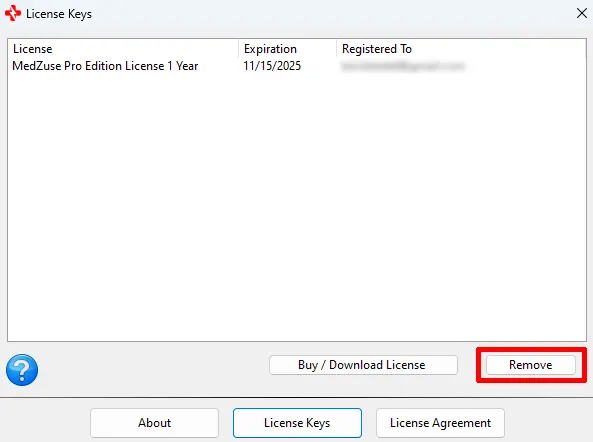
Step 3: A message box will appear, asking you if you want a refund with the removal of the license. Click on Yes.

Step 4: A message box will appear, asking you to confirm the permanent removal of the license with a full refund. Click on Yes.

It should take about a minute to process your refund. You will receive a message box confirming that your refund has been processed. Please allow up to 4 business days for the refund to show on your credit card account. If you have any issues obtaining a qualified refund, please contact us at support@truves.com.
Comments / Questions